> For the complete documentation index, see [llms.txt](https://docs.palliora.org/llms.txt). Markdown versions of documentation pages are available by appending `.md` to page URLs; this page is available as [Markdown](https://docs.palliora.org/defi/learn/how-it-works.md).
# How Palliora DeFi works
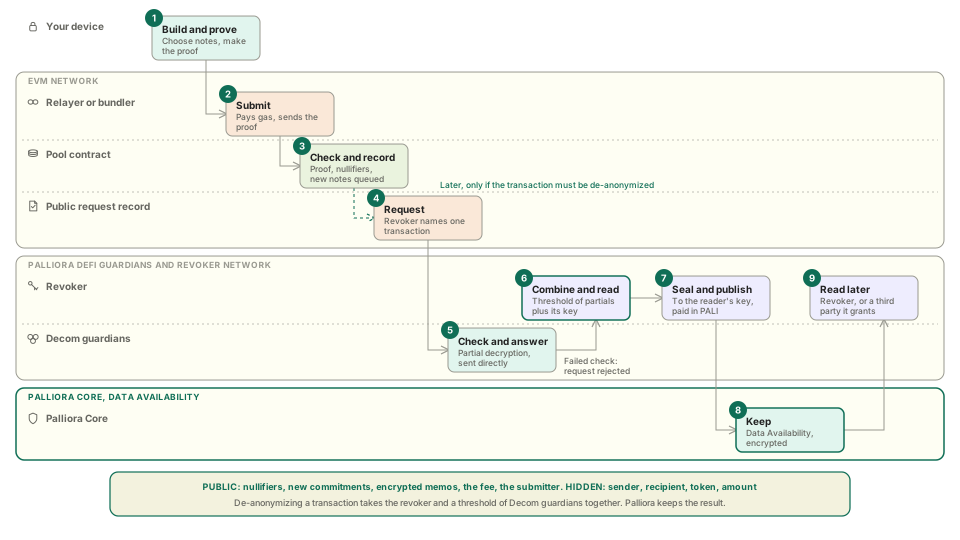
This page follows one private transaction from start to finish, then shows how it is de-anonymized when that is needed and how the result is kept on Palliora. It names each part, says what the public can see at each step, and links to the page that goes deeper.
## The parts
| Part | What it does | Where it runs |
| ------------------------------ | ----------------------------------------------------------------------------------------------------------------------------------------------------------------------------------------------- | -------------------------------------- |
| Shielded account | Holds your keys. Builds and proves your transactions. | Your browser or app |
| Pool | Holds the tokens. Keeps the tree of notes and the list of spent notes. Checks every proof. | A contract on Ethereum and on HyperEVM |
| Verifiers | Check zero-knowledge proofs. There is one per transaction shape. | Contracts |
| Relayer, bundler and paymaster | Submit your transaction and pay gas. | Services, plus a paymaster contract |
| Adaptors | Let a private transaction call another protocol. | Contracts |
| Screener | Blocks sanctioned addresses at deposit and registration. | A contract on Ethereum |
| Disclosure network | A revoker and Decom guardians who can de-anonymize one transaction together. | Services, with a public request record |
| Palliora Core | Keeps what a revoker de-anonymized as an encrypted report, with silent threshold encryption and Guardians. A Compute Contract coordinates storing and retrieving it, for the authorized actors. | Palliora's privacy engine |
A Decom guardian is a node that holds a share of the disclosure key. It is not a Palliora Guardian. Palliora Guardians have a different job: they protect the stored report. See [Accountable privacy and disclosure](/defi/learn/concepts/accountable-privacy-and-disclosure.md) and [Palliora integration](/defi/learn/concepts/palliora-integration.md).
## Life of a private transaction
1. **Create and register your account.** Your wallet signs a fixed message. The app turns the signature into your keys. You then register, which links your public address to your shielded address so others can send to you. See [Shielded accounts](/defi/learn/concepts/shielded-accounts.md).
2. **Deposit.** Tokens move from your wallet into the pool. A proof creates notes worth that amount. You pay gas for this step from your wallet, so it is public.
3. **Settle.** New notes join the commitment tree after the next tree update. A tree update is a proof that anyone can submit, and the app does it for you. Until then the balance shows as pending. See [Notes and commitments](/defi/learn/concepts/notes-and-commitments.md).
4. **Send, swap or withdraw.** You spend notes. The proof shows the notes exist, you own them, the value adds up, and the new notes are correct. The transaction reveals a nullifier for each spent note and a commitment for each new one, and nothing else about them. A relayer submits it. See [Shielded transactions](/defi/learn/concepts/shielded-transactions.md) and [Relaying and gas](/defi/learn/concepts/relaying-and-gas.md).
5. **Call another protocol, if you want.** For a swap, a loan or a stake, the pool sends the tokens to an adaptor, the adaptor calls the other protocol, and the result comes back to you as new notes. See [Adaptors](/defi/learn/concepts/adaptors.md).
6. **Disclose, only when needed.** Every transaction includes an encrypted seed. A revoker and a threshold of Decom guardians can de-anonymize it together. No one of them can do it alone. The revoker then keeps what it de-anonymized on Palliora, as an encrypted report. The revoker, or any third party the revoker grants access to, can open it. See [Palliora integration](/defi/learn/concepts/palliora-integration.md).
## What the public sees
| Action | Public | Hidden |
| ------------ | -------------------------------------------------------------------------- | ---------------------------------------------------- |
| Register | Your public address and your shielded address, linked | Nothing else. Your keys never leave your device. |
| Deposit | Your wallet, the token and the amount | Which notes you now own |
| Send | Nullifiers, new commitments, encrypted memos, and the fee token and amount | Sender, recipient, token and amount |
| Withdraw | The receiving address, the token and the amount | Which notes you spent, and the link to your deposits |
| Adaptor call | The adaptor, the tokens in and out, and its payload | Who made the call |
Privacy is as strong as the number of other people using the pool. Read the [Privacy model](/defi/learn/concepts/privacy-model.md) for what this means in practice.
## Where to go next
* [Concepts](/defi/learn/concepts.md) for each part in detail.
* [Quickstart](/defi/build/quickstart.md) to send a private transaction yourself.
* [Network reference](https://github.com/palliora-org/palliora-docs-with-ai/tree/main/defi/reference/network-reference.md) for contract addresses.
---
# Agent Instructions
This documentation is published with GitBook. GitBook is the documentation platform designed so that both humans and AI agents can read, navigate, and reason over technical content effectively. Learn more at gitbook.com.
## Querying This Documentation
If you need additional information that is not directly available in this page, you can query the documentation by asking a question.
Perform an HTTP GET request on the following URL with the `ask` and `goal` query parameters:
```
GET https://docs.palliora.org/defi/learn/how-it-works.md?ask=&goal=
```
`ask` is the immediate question: it should be specific, self-contained, and written in natural language.
`goal` is what the user is ultimately trying to achieve, the reason they need the answer. Sharing it helps GitBook give you a better, more relevant answer. A goal is most helpful when it describes the outcome the user wants rather than restating the question. For example, with `ask=how do I create an API token`, a goal like `automate deployments from our CI pipeline` lets GitBook tailor the answer to that use case.
The response will contain a direct answer to the question and relevant excerpts and sources from the documentation.
Use this mechanism when the answer is not explicitly present in the current page, you need clarification or additional context, or you want to retrieve related documentation sections.