> For the complete documentation index, see [llms.txt](https://docs.palliora.org/llms.txt). Markdown versions of documentation pages are available by appending `.md` to page URLs; this page is available as [Markdown](https://docs.palliora.org/defi/learn/concepts/private-sub-accounts.md).
# Private Sub-accounts
A Private Sub-account lets you trade perpetuals on Hyperliquid with private funding. You move money from your shielded balance into a fresh trading account that is not linked to you. You then trade from it directly.
## What is private and what is not
**Private funding of a public position. Not a private position.**
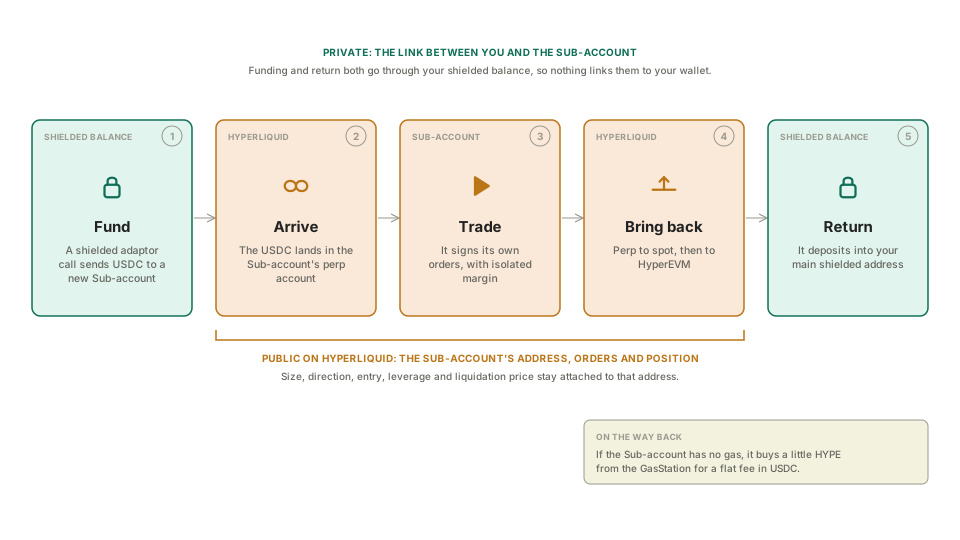
Size, direction, entry price, leverage and liquidation price are public on Hyperliquid. They stay attached to the Sub-account's address for good. What is hidden is the link between that address and you.
How well it stays hidden depends on the pool. The Sub-account is only as anonymous as the group of people moving similar amounts through the pool at similar times. See the [Privacy model](/defi/learn/concepts/privacy-model.md).
## How it works
1. **Fund.** You ask the app to open a position. It derives a new Private Sub-account and sends USDC to it from your shielded balance, in one shielded adaptor call. A relayer submits the call. The adaptor deposits the USDC into the Sub-account's Hyperliquid account through Circle's deposit contract.
2. **Arrive.** The USDC lands in the Sub-account's Hyperliquid perp account.
3. **Trade.** The Sub-account signs its own Hyperliquid orders, with isolated margin. No contract places the orders and no one holds the key for you.
4. **Close and bring back.** When you close, the money moves from perp to spot, then from Hyperliquid to HyperEVM.
5. **Return.** The Sub-account deposits the money into your main shielded address. The deposit does not say which account receives it.
On the way back, the Sub-account may have no HYPE for gas. The app buys a small amount from the GasStation for a flat fee in USDC. You sign that with the Sub-account's key, and the relayer submits it.
## Why a separate account
Hyperliquid's contract interface has no action to create accounts or to set margin mode. A contract could hold many users' positions in one account, but they would net into one position with one liquidation price, so one user's loss could affect another's. A separate account for each position keeps each one isolated and under your control.
## Keys
A Sub-account key comes from your shielded account's spending key and an index:
```
sub-account key = keccak256(spending key, network context, index)
```
The network context is different on mainnet and on testnet, so your mainnet and testnet Sub-accounts never share an address. You can always recover them from your wallet. The flip side is that anyone who gets your spending key can derive every Sub-account you have made.
## What the app does for you
* **A new Sub-account for each position.** The app does not reuse a spent one. Two positions on one address would link to each other.
* **Gas arrives safely.** The app never lets a Sub-account receive gas from your own wallet. That would link it to you for good.
* **Labels stay on your device.** Names and indexes never leave your device, including in analytics.
## What you can do to stay private
* Prefer round amounts. A withdrawal of 1,000 looks like many others. A withdrawal of 1,247.83 stands out.
* Choose your own timing. The app does not add a delay, because a forced delay would also slow you down when you need to add margin.
* Keep the way you trade varied across Sub-accounts. A steady style in size or timing can link them.
* Remember that the return deposit shows an amount. Profit and loss are rarely round numbers.
The relayer sees the Sub-account address, the amount and the time. It never sees who you are.
## Costs
A Sub-account trade has a relayer fee, a gas fee for the return, and a one-time charge by Hyperliquid on the first transfer out. See [Fees](/defi/reference/fees.md) for the amounts.
## Next
* [Private Sub-accounts SDK](/defi/build/private-sub-accounts-sdk.md)
---
# Agent Instructions
This documentation is published with GitBook. GitBook is the documentation platform designed so that both humans and AI agents can read, navigate, and reason over technical content effectively. Learn more at gitbook.com.
## Querying This Documentation
If you need additional information that is not directly available in this page, you can query the documentation by asking a question.
Perform an HTTP GET request on the following URL with the `ask` and `goal` query parameters:
```
GET https://docs.palliora.org/defi/learn/concepts/private-sub-accounts.md?ask=&goal=
```
`ask` is the immediate question: it should be specific, self-contained, and written in natural language.
`goal` is what the user is ultimately trying to achieve, the reason they need the answer. Sharing it helps GitBook give you a better, more relevant answer. A goal is most helpful when it describes the outcome the user wants rather than restating the question. For example, with `ask=how do I create an API token`, a goal like `automate deployments from our CI pipeline` lets GitBook tailor the answer to that use case.
The response will contain a direct answer to the question and relevant excerpts and sources from the documentation.
Use this mechanism when the answer is not explicitly present in the current page, you need clarification or additional context, or you want to retrieve related documentation sections.